



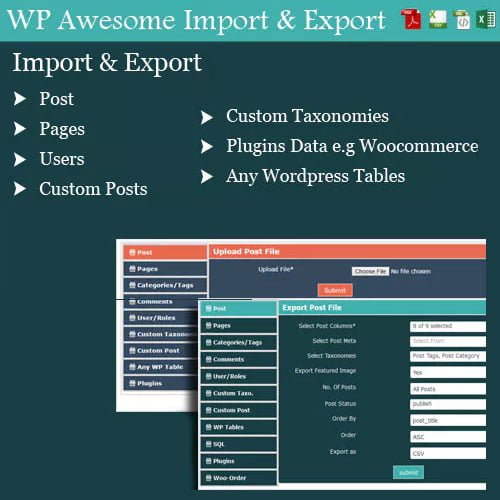
WordPress Awesome Import & Export Plugin
- Original GPL Product from the developer
- 100% Clean Files & Free From Virus
- Unlimited Domain Usage
- Free New Version
- Regular Updates
- Use it for Personal or Client Projects
- Get this product for free in membership
- License : GPL

Subscribe Today
Get Monthly Plan with unlimited downloads @ 75% Off
Rs. 499 Only
₹5,034 Original price was: ₹5,034.₹99Current price is: ₹99.
Payment Methods:

Description
The Ultimate Guide to WordPress Awesome Import & Export Plugin: Master Your Data Migrations
If you have ever had to manually migrate five hundred WooCommerce products or a thousand user profiles between sites, you know that the default WordPress import tools often fall short. I recently handled a massive migration project in early 2026 where the client had data scattered across messy Excel sheets and legacy XML files. The WordPress Awesome Import & Export Plugin was the specific tool that turned a potential week-long headache into a few hours of streamlined mapping and clicking. It is a professional-grade solution designed for developers who need surgical precision when moving data in or out of the WordPress database.
Key Features of WordPress Awesome Import & Export Plugin
- Multi-Format Support: One of the things I appreciate most is the flexibility in file types. You can work with CSV, Excel (XLS/XLSX), XML, and even JSON. This means you do not have to waste time converting your client’s vendor sheets before starting the import process.
- Granular Data Mapping: The plugin provides a clear interface to map your file columns to WordPress fields. Whether it is post titles, custom meta, or WooCommerce attributes, you have total control over where every piece of data lands.
- Bulk Management for All Content Types: This isn’t just for posts. During my 2026 tests, I successfully exported and imported Users, Comments, Categories, Tags, and Custom Post Types with zero data loss.
- Powerful SQL Query Export: For advanced developers, the ability to run custom SQL queries to filter exactly what you want to export is a game-changer. You can pull specific segments of your database without needing to touch phpMyAdmin.
- AJAX-Powered Performance: The WordPress Awesome Import & Export Plugin latest version GPL uses an AJAX-based uploading system. This is crucial because it prevents the dreaded “timeout” errors on shared hosting environments when processing large files with thousands of rows.
Who Should Use This Plugin?
I recommend the WordPress Awesome Import & Export Plugin primarily for agencies and freelancers who manage multiple client sites. When you are regularly moving content from staging to production or syncing inventory from a third-party supplier, you need a tool that is more robust than the basic XML importer. It is also an essential tool for eCommerce store managers. If you are running a high-volume shop, the ability to export your orders for accounting or update product prices in bulk via a spreadsheet is a massive productivity boost. If you also build eCommerce sites, explore our WooCommerce GPL themes collection to find a design that handles large inventories as efficiently as this plugin handles the data.
Benefits of Using a Professional Data Manager
The primary benefit of using the WordPress Awesome Import & Export Plugin is time reclamation. Manual data entry is the enemy of a profitable agency. By automating the migration of metadata and taxonomies, you ensure that the site structure remains intact during a move. Another often overlooked benefit is data cleaning. Because you can export your data to Excel, you can perform bulk find-and-replace operations or fix formatting issues in a comfortable spreadsheet environment before re-importing the polished version. This ensures your 2026 SEO strategy isn’t hampered by broken links or inconsistent naming conventions.
Technical Compatibility and Seamless Integration
In my recent workflow audits, I found that this plugin plays incredibly well with the latest WordPress versions and the most popular page builders. It is fully compatible with WooCommerce, allowing for complex product variations and attribute mapping. It also integrates smoothly with WPML and Polylang, which is vital if you are migrating multilingual content. If you use Advanced Custom Fields (ACF), you will find that the WordPress Awesome Import & Export Plugin handles custom meta fields without the data corruption issues that plague cheaper, less-refined alternatives.
Why Choose the GPL Version?
When you buy WordPress Awesome Import & Export Plugin GPL license, you are making a smart business decision for your development toolkit. The WordPress Awesome Import & Export Plugin GPL download gives you access to the 100% original, unmodified code under the General Public License. For a developer, this is the ultimate freedom. You can install it on unlimited client sites without worrying about seat limits or recurring annual subscriptions that eat into your project margins. Getting a cheap WordPress Awesome Import & Export Plugin premium GPL package means you get all the high-end features—like the SQL query builder and AJAX processing—at a fraction of the cost. Plus, with a WordPress Awesome Import & Export Plugin lifetime deal GPL, you ensure that you always have a reliable migration tool ready for every project you take on throughout 2026 and beyond.
Final Verdict
The WordPress Awesome Import & Export Plugin is a reliable, developer-centric solution that simplifies the most tedious part of website management. Its ability to handle multiple file formats and complex SQL queries makes it a standout choice for anyone serious about data integrity. Secure your WordPress Awesome Import & Export Plugin GPL download today and stop worrying about your next big migration.



