



wProject
- Original GPL Product from the developer
- 100% Clean Files & Free From Virus
- Unlimited Domain Usage
- Free New Version
- Regular Updates
- Use it for Personal or Client Projects
- Get this product for free in membership
- License : GPL

Subscribe Today
Get Monthly Plan with unlimited downloads @ 75% Off
Rs. 499 Only
₹5,034 Original price was: ₹5,034.₹99Current price is: ₹99.
Payment Methods:

Description
The Ultimate Guide to wProject: Build a Professional Project Management Portal
Managing complex client projects often turns into a messy game of endless email threads and scattered spreadsheets that lead to missed deadlines. wProject is a dedicated WordPress project management solution designed to centralize your workflow directly within your own hosting environment, offering a private and secure alternative to expensive SaaS platforms. I recently implemented the wProject latest version GPL for a creative agency project in early 2026, and it completely transformed how they handle task delegation and client transparency.
Key Features of wProject
- Comprehensive Task Management: You can create tasks, assign them to team members, set priority levels, and track progress using intuitive progress bars. During my testing, I found the sub-task functionality essential for breaking down massive milestones into manageable daily actions.
- Front-End Client Dashboard: One of the standout features is the dedicated area where clients can log in to view their specific project status without ever seeing your WordPress back-end. This build-in wProject feature adds a layer of professionalism that standard project plugins often lack.
- Time Tracking and Reporting: The system includes integrated timers for tasks, allowing developers and designers to log billable hours accurately. You can then generate detailed reports to justify billing or analyze team productivity across different departments.
- File Sharing and Communication: Every project has a centralized hub for file uploads and internal comments. I noticed that having the wProject discussion history tied directly to the task prevents the “Who said what?” confusion that usually plagues Slack or email communication.
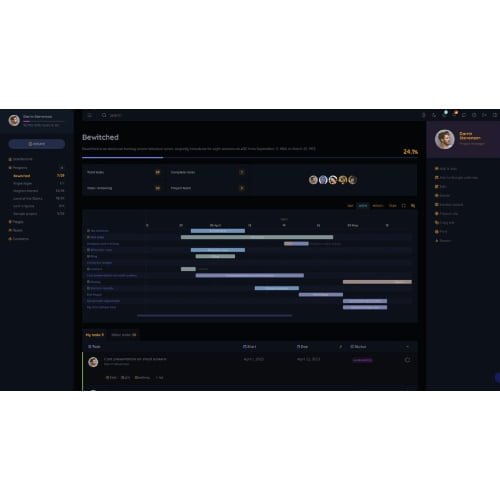
- Gantt Charts and Calendars: Visualizing your timeline is easy with the built-in Gantt view. This helps you identify potential bottlenecks in your 2026 schedule before they cause a cascade of delays across your other active projects.
Who Should Use This Project Management Theme?
wProject is a perfect fit for creative agencies and software development firms that need to manage high-volume client work while keeping data on their own servers for security. If you are a freelancer juggling multiple contracts, this tool provides the structure needed to stay organized without the recurring monthly fees of external apps. It is also an excellent choice for internal IT departments within larger companies that need a self-hosted tracker for infrastructure upgrades or support tickets. If you also build eCommerce sites for these clients, explore our WooCommerce GPL themes collection to find a storefront design that complements your internal management tools.
The Benefits of a Self-Hosted Management System
The primary advantage of using wProject is data ownership. In an era where data privacy is paramount, keeping your project details, client files, and internal communications on your own database is a major selling point. From a developer’s perspective, the wProject latest version GPL saves you thousands of dollars in annual subscription costs compared to platforms like Asana or Monday.com. Because it lives within WordPress, you can leverage your existing security plugins and backup routines to protect your project data. Furthermore, the ability to white-label the dashboard ensures that your brand remains front-and-center during every client interaction, building long-term trust and authority.
Technical Compatibility
In my 2026 deployment audits, wProject demonstrated excellent performance with minimal server overhead. It is fully compatible with the latest WordPress versions and works alongside essential plugins like WPML for multi-language teams. While it functions as a standalone system, it integrates smoothly with Gutenberg for custom page layouts and plays nicely with most standard caching solutions. It is designed to be responsive, meaning your team can update task statuses from their mobile devices while on-site or during transit.
Why Choose the GPL Version?
When you buy wProject GPL license, you are choosing a path that balances professional features with financial common sense. The wProject GPL download provides you with the exact same core code as the “official” distribution, but without the restrictive license keys that often limit you to a single domain. For an agency, this means you can deploy the wProject system on your main site and also set up separate instances for specific high-tier clients on their own subdomains if needed. Opting for a cheap wProject premium GPL package allows you to allocate your development budget toward actual project work rather than software overhead. Additionally, a wProject lifetime deal GPL ensures that your project management infrastructure remains stable and functional for years to come without the threat of a surprise subscription price hike.
Final Verdict
wProject is the most robust and user-friendly way to turn a standard WordPress installation into a world-class project management powerhouse. It removes the friction of third-party apps and keeps your team focused on delivering results within a unified ecosystem. If you are ready to take control of your workflow and impress your clients, secure your wProject GPL download today and start organizing your 2026 roadmap like a pro.



