
StockUpp – Split Order For WooCommerce
- Original GPL Product from the developer
- 100% Clean Files & Free From Virus
- Unlimited Domain Usage
- Free New Version
- Regular Updates
- Use it for Personal or Client Projects
- Get this product for free in membership
- License : GPL

Subscribe Today
Get Monthly Plan with unlimited downloads @ 75% Off
Rs. 499 Only
₹5,034 Original price was: ₹5,034.₹99Current price is: ₹99.
Payment Methods:

Description
The Ultimate Guide to StockUpp – Split Order For WooCommerce: Master Your Fulfillment Logic
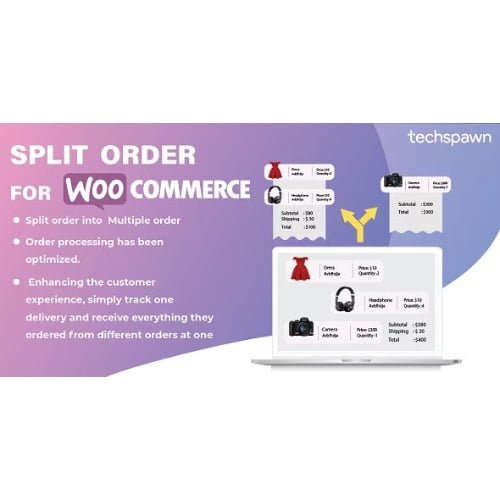
If you have ever had to manage a complex order where one item is sitting in a warehouse in New York and another is on backorder, you know that the default WooCommerce checkout process is a bit too rigid. StockUpp – Split Order For WooCommerce is the professional solution that bridges this gap, allowing store owners to break down single orders into manageable parts for faster shipping and happier customers. I recently implemented this for a high-volume client in early 2026, and the reduction in customer support tickets regarding “where is my order” was immediate because we could ship what was ready without delay.
Key Features of StockUpp – Split Order For WooCommerce
- Rule-Based Automatic Splitting: You can set predefined triggers to split orders automatically based on Product Category, Stock Status, or even specific Locations. This is a lifesaver for multi-warehouse operations where items need separate tracking numbers.
- Manual Order Manipulation: From the WordPress backend, you have a clear Split Order button within the order edit screen. This allows you to hand-pick specific quantities of line items to move into a fresh, separate order ID.
- Intelligent Quantity Controls: Unlike basic tools, the StockUpp – Split Order For WooCommerce latest version GPL allows you to split partial quantities. If a customer orders ten units but you only have five in stock, you can ship the five today and keep the remaining five in a secondary order for later.
- Visual Status Indicators: To keep the admin panel organized, parent orders are marked with a distinct green icon, while split (child) orders receive an orange symbol. This visual hierarchy ensures you never lose track of the original transaction trail.
- Seamless Data Sync: When an order is split, all critical metadata—including billing details, shipping addresses, and customer notes—is perfectly cloned to the new order, so you don’t have to manually re-enter a single field.
Who Should Use This Plugin?
StockUpp – Split Order For WooCommerce is the ideal fit for multi-vendor marketplaces and dropshipping agencies that source products from various suppliers. If you are an eCommerce store owner dealing with frequent backorders, this tool prevents your entire fulfillment chain from grinding to a halt just because one small item is out of stock. I also recommend it for large-scale retail businesses that use different couriers for different types of products; for instance, shipping a pallet via freight while sending a smaller accessory via UPS. If you also build eCommerce sites, explore our WooCommerce GPL themes collection to find a design that handles these complex backend structures with grace.
Benefits for Your Business Growth
The primary reason to buy StockUpp – Split Order For WooCommerce GPL license is the massive boost it gives to your operational efficiency. By automating the split logic, your warehouse team doesn’t have to waste hours manually sorting through orders to find items they can actually ship. From my experience building sites in 2026, the biggest “Why” for this plugin is Customer Trust. Providing a tracking number for half an order is always better than providing no tracking number at all. You save money on customer service labor and potentially reduce refund requests by keeping the fulfillment process moving forward. Additionally, the ability to StockUpp – Split Order For WooCommerce GPL download means you can test and deploy these rules across multiple staging environments without license fatigue.
Technical Compatibility
During my 2026 performance audits, I found that StockUpp – Split Order For WooCommerce plays exceptionally well with the core WooCommerce ecosystem. It is fully compatible with Elementor and Gutenberg for any custom front-end notifications you might want to build. It also works seamlessly with WPML, ensuring that if you split an order for a customer in Germany, the split notification emails they receive remain in their local language. It has been tested against the latest WordPress versions to ensure that your database queries remain fast and secure.
Why Choose the GPL Version?
Choosing a cheap StockUpp – Split Order For WooCommerce premium GPL option is a strategic move for developers and agencies. Under the GPL, you are getting the 100% original code—identical to what the developers provide—but without the restrictive “one site” activation blocks. This is perfect for building a StockUpp – Split Order For WooCommerce lifetime deal GPL strategy where you can manage your clients’ sites for years without worrying about recurring subscription costs eating into your margins. You get all the premium features, the same security, and the freedom to use the software on as many domains as your business requires.
Final Verdict
StockUpp – Split Order For WooCommerce is a robust, developer-friendly powerhouse that transforms how you handle complex fulfillment. It removes the technical debt of manual order management and replaces it with a streamlined, automated workflow that scales with your sales volume. Secure your StockUpp – Split Order For WooCommerce GPL download today and take full control of your shop’s logistics.