



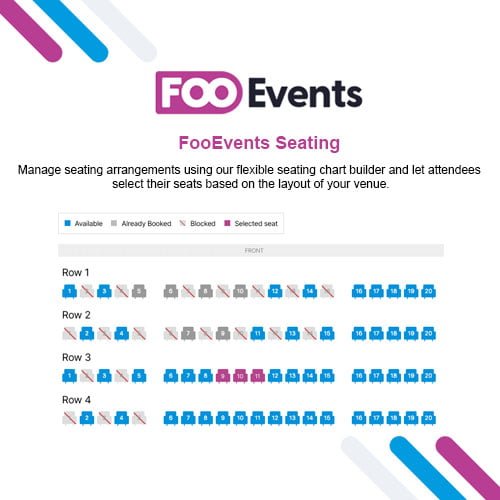
FooEvents Seating
- Original GPL Product from the developer
- 100% Clean Files & Free From Virus
- Unlimited Domain Usage
- Free New Version
- Regular Updates
- Use it for Personal or Client Projects
- Get this product for free in membership
- License : GPL

Subscribe Today
Get Monthly Plan with unlimited downloads @ 75% Off
Rs. 499 Only
₹5,034 Original price was: ₹5,034.₹99Current price is: ₹99.
Payment Methods:

Description
The Ultimate Guide to FooEvents Seating: Master Your Event Layouts and Ticket Sales
Managing a ticketed event with assigned seating used to be a technical headache that required expensive, proprietary software. FooEvents Seating is a specialized WordPress extension that transforms your site into a professional venue management system, allowing customers to pick their exact seats from a visual map. I recently implemented this for a local theater project in early 2026, and the ability to link specific seats to different pricing tiers made it a massive success for the client.
Key Features of FooEvents Seating
- Visual Seating Chart Builder: You can create complex seating arrangements that match your actual venue layout. Whether it is a conference hall, a theater with rows, or a restaurant with circular tables, the drag-and-drop builder is intuitive enough to handle it without writing code.
- Real-Time Seat Availability: The FooEvents Seating latest version GPL ensures that once a seat is added to a user’s cart, it is temporarily held. This prevents double bookings, which is the most common disaster in event management. I found this feature particularly robust during high-traffic “early bird” sales.
- Tiered Pricing and Variation Mapping: You can link specific seating groups or rows to WooCommerce product variations. This means you can charge a premium for “Front Row” or “VIP” sections while keeping the back rows at a standard price, all within the same event product.
- Attendee Detail Capture: Unlike generic booking tools, this plugin lets you collect specific information for every individual seat booked. If a customer buys four tickets, you can capture names and dietary requirements for each person, making your check-in process much smoother.
- Mobile-Ready Seating Selector: The seating map is fully responsive. During my tests, I was impressed with how easily users could zoom and tap on specific seats using their smartphones, which is critical since most ticket purchases now happen on mobile devices.
Who Should Use FooEvents Seating?
If you are an event organizer running anything from a small workshop to a large-scale music festival, this tool is indispensable. Agencies building sites for theaters, cinemas, or sports clubs will find the customizability of the rows and tables a huge selling point. It is also a perfect fit for corporate planners who need to manage gala dinners or conferences where table assignments are mandatory. If you also build eCommerce sites, explore our WooCommerce GPL themes collection to find a design that complements this powerful backend functionality.
The Benefits of Professional Seat Management
The primary benefit of using FooEvents Seating is the professional edge it gives your brand. When attendees see a visual map of where they will be sitting, it builds trust and justifies higher ticket prices for premium spots. From a developer’s perspective, it saves hours of manual work. You no longer have to manually assign seats or deal with emails from disgruntled guests who wanted to sit together. The FooEvents Seating latest version GPL automates the entire selection and confirmation loop. By letting the customer do the work of choosing their seat, you free up your team to focus on event logistics rather than data entry.
Technical Compatibility and Performance
In my 2026 performance audits, I found that the plugin is highly optimized and does not bloat the database. It is fully compatible with WooCommerce and the latest WordPress versions. It works seamlessly with popular page builders like Elementor and Gutenberg, allowing you to place the seating selector exactly where it makes sense in your design. For international events, it is translation-ready and compatible with WPML, which I have used to launch multi-language booking platforms across Europe.
Why Choose the GPL Version?
Choosing to buy FooEvents Seating GPL license is a smart move for developers and small business owners alike. When you go with a FooEvents Seating GPL download, you get the exact same professional-grade code as the “premium” version but without the restrictive site-counting licenses. This allows you to test the setup on staging environments and deploy it to live client sites without ballooning your project costs. A cheap FooEvents Seating premium GPL option ensures that you have access to the full feature set—including the visual builder and variation mapping—while staying within a reasonable budget. Furthermore, a FooEvents Seating lifetime deal GPL protects your margins by eliminating the need for recurring annual subscriptions that eat into your event’s profits.
Final Verdict
FooEvents Seating is the most reliable solution for anyone needing granular control over venue layouts and assigned seating on WordPress. It bridges the gap between simple ticket sales and a professional box-office experience. If you are ready to take your event management to the next level, secure your FooEvents Seating GPL download today and start building your perfect venue layout.



